

Author: Abhishek Singh | SEO & CRO Consultant | 6+ Years of Experience
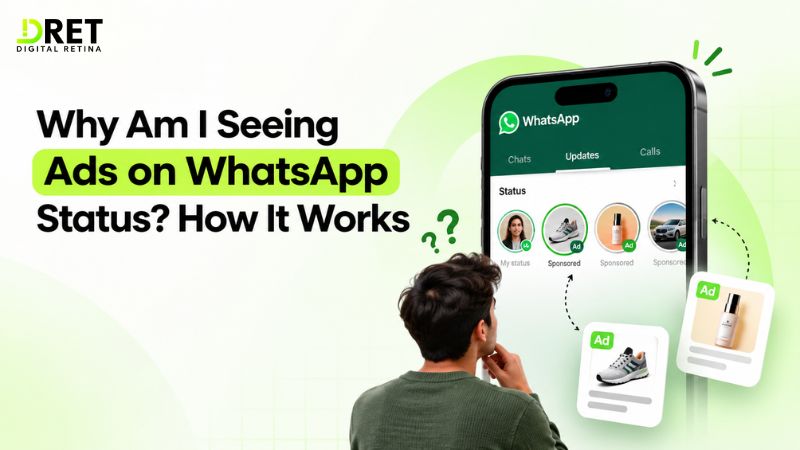
Ads appear in the Updates tab, not in your chats or calls, so you may see them when you open Status or Channels. WhatsApp introduced ads in Status as part of its broader Updates tab changes, while keeping personal messaging separate from advertising.
WhatsApp says the ads can be personalized using limited information such as your country or city, language, Channels you follow, and how you interact with ads. If you have added WhatsApp to your Meta Account, information and ad preferences from your Meta accounts can also be used.
How Do WhatsApp Status Ads Work?
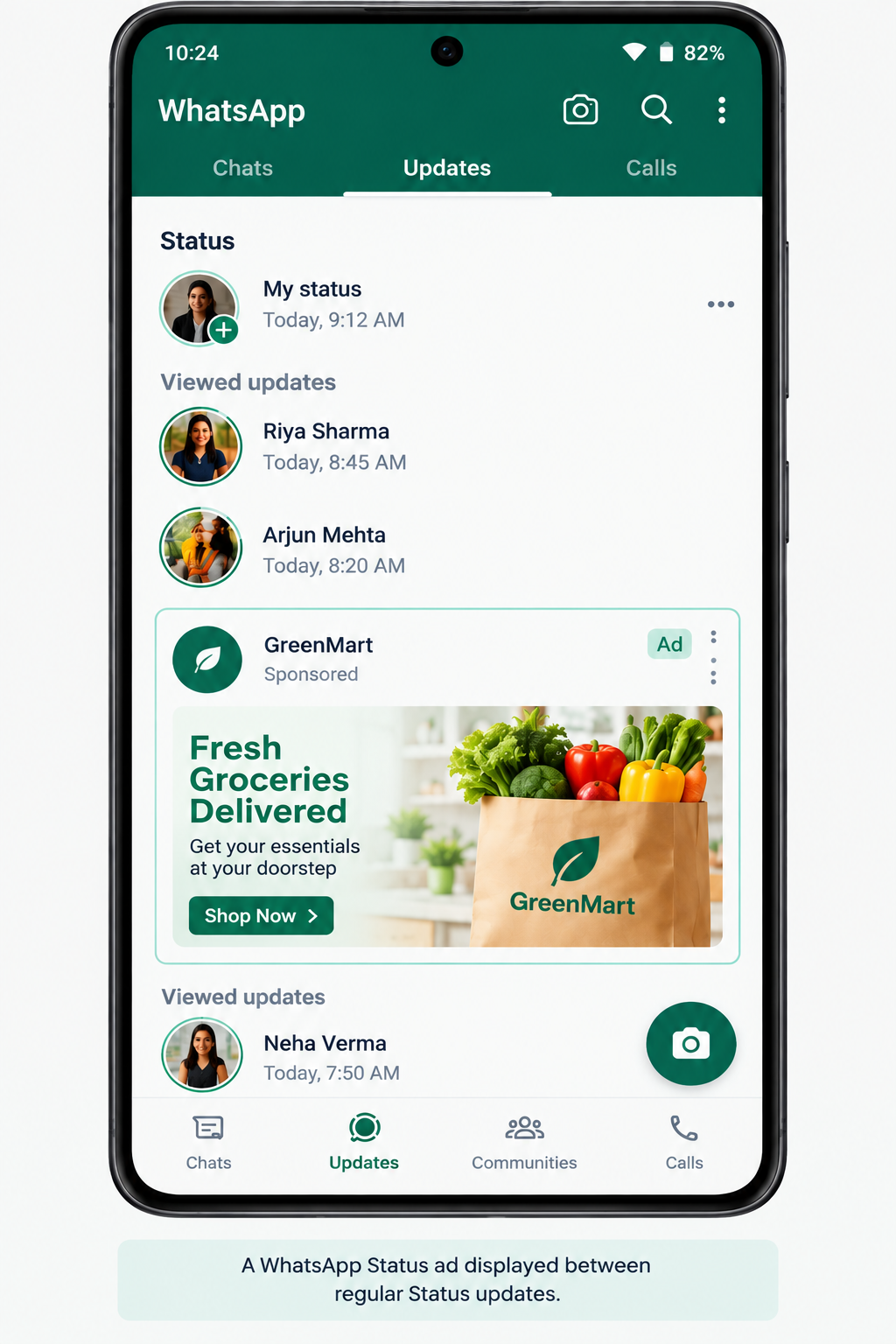
WhatsApp Status ads are paid advertisements that appear between Status updates in the Updates tab. They are designed to look like part of the Status browsing experience while being clearly identified as advertising.
Meta announced ads in Status on June 16, 2025, alongside Promoted Channels and Channel Subscriptions. The company said these features would appear only in the Updates tab, away from personal chats.
When you browse Status, you may therefore encounter:
-
Personal Status updates: Updates posted by your contacts.
-
Status ads: Paid promotions from businesses.
-
Channels: Public updates from creators, organizations and businesses.
-
Promoted Channels: Paid channel recommendations in the Channels directory.
A Status ad can also give you an option to interact with the business or start a conversation about the advertised product or service.
What Information Is Used for WhatsApp Ads?
WhatsApp says it uses limited information to help determine which ads may be relevant to you. The company does not describe this as reading your private conversations.
|
Information |
Used for ads? |
How it can matter |
|
Country or city |
Yes |
Helps with geographic relevance |
|
Language |
Yes |
Helps match ads to language preferences |
|
Channels you follow |
Yes |
Can indicate areas of interest |
|
Channels you view or interact with |
Yes |
Helps understand your Updates activity |
|
Interactions with ads |
Yes |
Includes actions such as viewing or tapping an ad |
|
Ad preferences from connected Meta accounts |
Yes, if applicable |
Can influence ad personalization |
|
Personal messages |
No |
Not used to determine ads |
|
Calls |
No |
Not used to determine ads |
|
Groups |
No |
Not used to determine ads |
|
Personal Status content |
No |
Not used to show ads |
For the latest details, see WhatsApp's Help Center on ads in Status and Channels and WhatsApp's Status and Channels privacy policy. WhatsApp Status and Channels Privacy Policy
Does WhatsApp Use My Private Chats to Show Ads?
No. WhatsApp says your personal messages and calls are end-to-end encrypted and are not used to determine the ads you may see. This separation is one of the main points WhatsApp makes about advertising in the Updates tab.
Meta also states that personal messages, calls and groups are not used to determine the ads shown to you.
So, if you are wondering, "Is WhatsApp reading my chats to show me ads?", the answer from WhatsApp's published information is no.
Why Do I See Certain Ads on WhatsApp?
You may see a particular ad because it matches information WhatsApp uses for ad personalization, such as your location, language, Channel activity or previous ad interactions. The system can use these signals to determine which advertisements are more relevant to you.
For example, if you regularly follow Channels related to travel, technology, shopping or entertainment, that activity can contribute to the types of ads you are shown.
Your ad experience can also be affected by your Meta Account if you have chosen to add WhatsApp to it. Meta says information and ad preferences from across your Meta accounts can then be used for WhatsApp advertising.
Why Do I See Ads for Things I Only Talked About?
Seeing an ad after talking about a product does not necessarily mean WhatsApp used that conversation to target you. Other signals can produce a similar result.
For example, the advertised product may match:
-
Your general location
-
Your language
-
Channels you follow or view
-
Your previous interactions with advertisements
-
Information or ad preferences from connected Meta accounts
-
Broader advertising audiences selected by the advertiser
This can make an advertisement feel unusually specific even when the private conversation itself was not used to determine the ad.
Where Do WhatsApp Ads Appear?
WhatsApp Status ads appear in the Updates tab, between Status updates, while Promoted Channels appear in the Channels directory. These advertising experiences are separate from your personal chats and calls.
Meta introduced all three Updates-related features together:
-
Ads in Status: Businesses can promote products or services through Status.
-
Promoted Channels: Paid recommendations can help Channels gain visibility in the Channels directory.
-
Channel Subscriptions: Users can subscribe to participating Channels for exclusive updates.
Meta says these experiences are designed to stay away from WhatsApp chats and the inbox.
If you do not open the Updates tab, you may simply encounter fewer of these advertising experiences.
Why Are WhatsApp Status Ads Appearing Now?
WhatsApp began introducing Status ads in 2025 as part of a larger effort to make the Updates tab a place where people can discover businesses and Channels.
Meta announced the new advertising features on June 16, 2025, saying the Updates tab was being used by 1.5 billion people per day globally. Meta said the features would roll out slowly over the following months.
In India, Meta announced on September 18, 2025 that brands including Maruti Suzuki, Air India and Flipkart were using ads in Status. It said people in India using the Updates tab would start seeing them, with the features rolling out slowly over the following months.
So, if you started noticing ads on WhatsApp after previously seeing only personal Status updates, the change is connected to this rollout rather than a change to advertising inside your private chats.
How Can I Find Out Why a WhatsApp Ad Was Shown to Me?
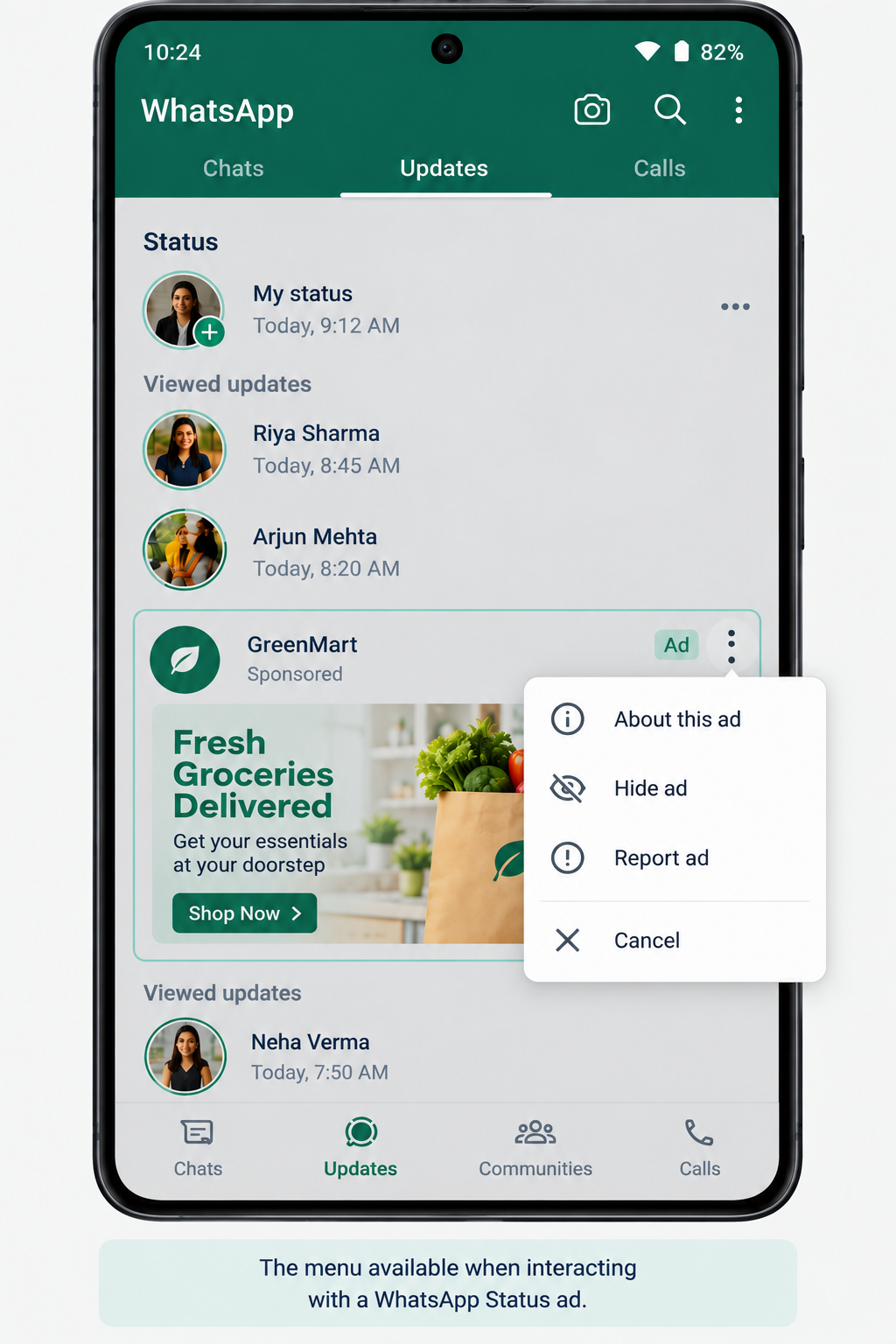
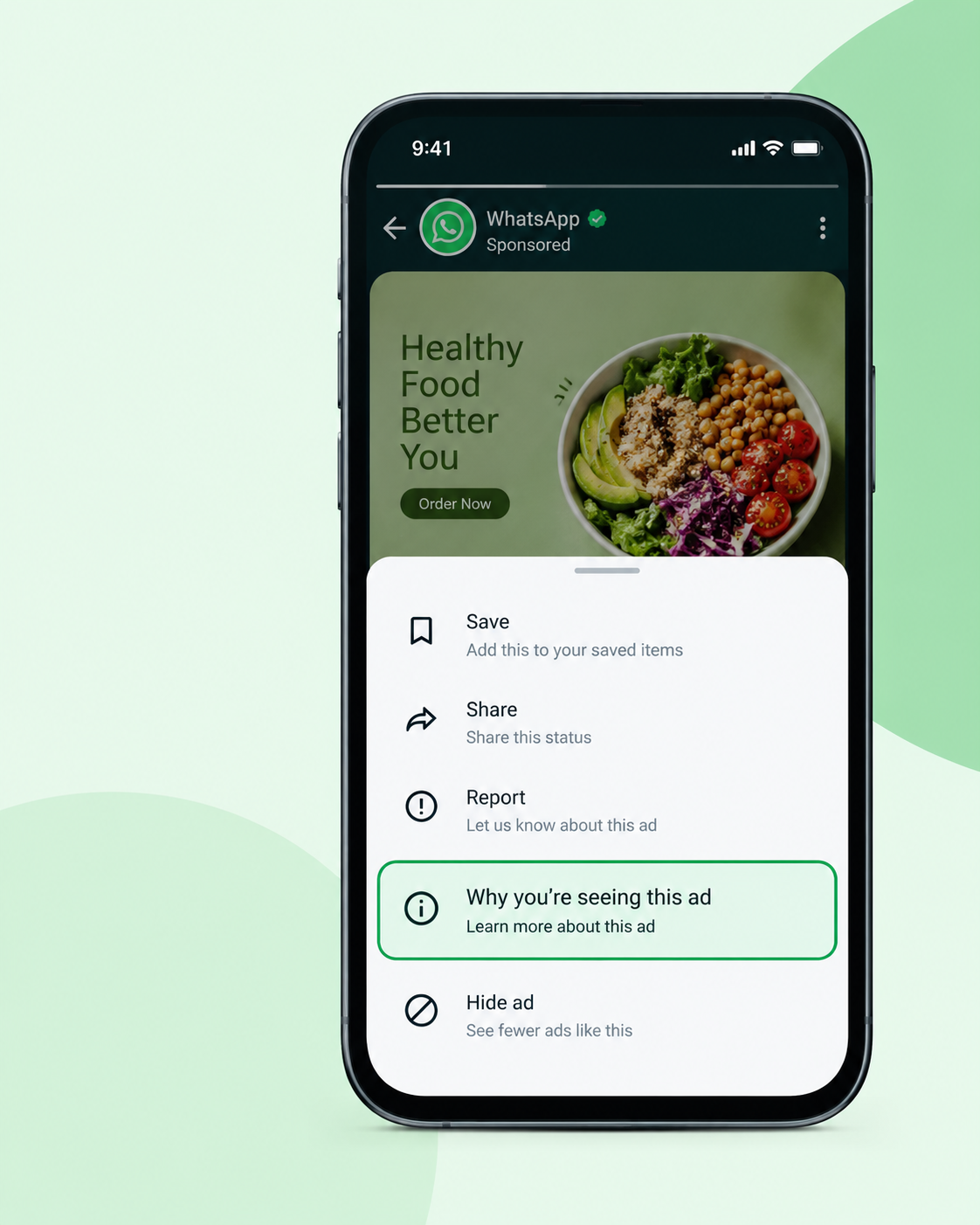
WhatsApp provides a "Why you're seeing this ad" option that can help explain why a particular advertisement was shown.
When you see an ad in Status:
-
Open the ad.
-
Open the ad's menu or options.
-
Look for "Why you're seeing this ad."
-
Review the information WhatsApp provides about the ad.
-
If you do not want to see that advertisement, use the available option to hide or report it.
WhatsApp's Help Center also provides options to hide or report an ad. About seeing ads on WhatsApp Status
This is more useful than trying to guess why an advertisement appeared based only on something you recently searched for or discussed elsewhere.
Can I Stop or Turn Off WhatsApp Status Ads?
WhatsApp's current Help Center does not provide a general switch that turns off all Status advertising. However, you can control some parts of your Updates experience.
You can:
-
Hide an unwanted ad: Use the ad's menu and select the available hide option.
-
Report an ad: Report advertisements you believe are inappropriate or suspicious.
-
Unfollow Channels you no longer want: This can reduce unwanted Channel recommendations and content, although it does not mean all ads will disappear.
-
Spend less time in the Updates tab: Ads in Status and Promoted Channels are part of the Updates experience.
-
Review your Meta Account connection: If WhatsApp is connected to your Meta Account, review the accounts and ad preferences associated with it.
These controls can change your experience, but they should not be treated as a complete way to remove WhatsApp advertising.
What Is Meta Account and How Does It Affect WhatsApp Ads?
Meta Account is the account system that connects certain Meta services and settings, and WhatsApp says adding WhatsApp to it is optional. Depending on your setup, WhatsApp may be connected with your other Meta accounts.
Meta's June 2025 announcement said that people who choose to add WhatsApp to Accounts Center can have ad preferences and information from across their Meta accounts used for WhatsApp advertising.
WhatsApp is also transitioning the name Accounts Center to Meta Account, with the new name being introduced gradually. Users may therefore see either name depending on their account and app version.
If you previously added WhatsApp to the same Meta Account, or choose to add it, that connection can affect the information used for ad personalization.
Is It Safe to Tap a WhatsApp Status Ad?
A Status ad can take you to a business interaction, so treat it like any other online advertisement and check who is behind it before sharing information. Meta says Status ads can help people discover businesses and start conversations about products or services.
For basic safety:
-
Check the advertiser's name before interacting.
-
Do not share your OTP, password, card PIN or banking credentials with an advertiser.
-
Be cautious of offers that create unusual urgency or ask for payment through unfamiliar methods.
-
Check the business website or other official information before making a purchase.
-
Use WhatsApp's reporting option if an ad appears suspicious or misleading.
An advertisement appearing inside WhatsApp does not automatically mean the advertiser is trustworthy.
FAQ
Why am I seeing ads on WhatsApp Status?
Ads appear in the Updates tab as part of WhatsApp's Status advertising system. WhatsApp can use limited information such as location, language, Channel activity and ad interactions to personalize ads.
Does WhatsApp read my chats to show ads?
No. WhatsApp says personal messages, calls and groups are not used to determine the ads you may see.
Can I turn off WhatsApp Status ads?
WhatsApp's current Help Center does not provide a general setting to turn off all Status ads. You can hide or report individual ads and manage parts of your Updates experience.
Why do WhatsApp ads seem related to things I recently discussed?
The match can come from other signals such as location, language, Channel activity, ad interactions or connected Meta account information. A private WhatsApp conversation is not used to determine the ad.
Where do WhatsApp ads appear?
Status ads appear in the Updates tab between Status updates. Promoted Channels can appear in the Channels directory.
Can I see why a WhatsApp ad was shown to me?
Yes. WhatsApp provides a "Why you're seeing this ad" option for ads, along with options to hide or report them.
Final Takeaway
WhatsApp Status ads appear in the Updates tab because WhatsApp is using that part of the app for business and Channel discovery. The ads can be personalized using limited information such as location, language, Channel activity and ad interactions.
If an ad seems strangely specific, that does not mean WhatsApp used your private conversation to target you. You can use "Why you're seeing this ad", hide unwanted ads and review your Updates and Meta Account settings to better understand your ad experience.
Ready to Implement These Strategies?
Our team of digital marketing experts can help you navigate these trends and create a winning strategy.